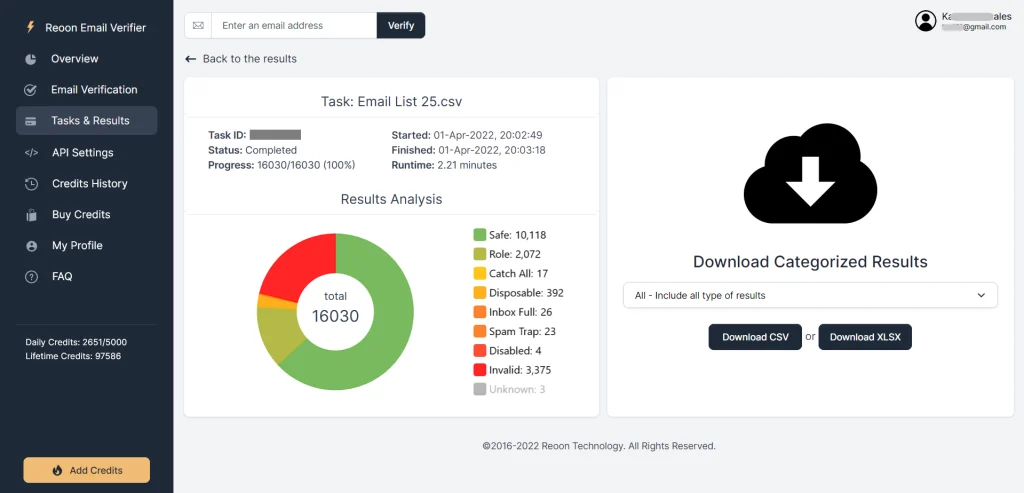
When you verify an email list, every address comes back with a status — Safe, Catch-All, Invalid, Unknown, and a few others. Each one is an instruction in disguise: some addresses you keep, some you delete immediately, and some need special handling. This guide explains what every email verification status means, why an address ends up with it, and exactly what to do with each pile in your results.
Here’s the quick-reference version. The details for each status follow below.
| Status | What it means | What to do |
|---|---|---|
| Safe | Mailbox exists and accepts mail; no risk flags | Keep — this is your sending list |
| Role | Valid, but a shared company address (info@, support@) | Keep selectively — fine for B2B, weaker for newsletters |
| Catch-All | Domain accepts mail for any name, so the mailbox can’t be confirmed | Handle separately, with caution |
| Temporary/Disposable | Throwaway address that expires shortly after creation | Delete |
| Invalid | No mailbox exists — a guaranteed hard bounce | Delete, never re-add |
| Inbox Full | Real mailbox that can’t accept new mail right now | Keep briefly; delete if it persists |
| Spamtrap | An address that exists only to catch careless senders | Delete immediately |
| Disabled | Existed once; the provider shut it down | Delete, same as invalid |
| Unknown | The server wouldn’t give a definitive answer | Re-verify later or treat as risky (credits are refunded) |


What each email verification status means
These statuses appear in Reoon Email Verifier‘s bulk verification results and in Power Mode single checks. Other services use similar categories under slightly different names, so the advice below travels well.
Safe
The best result there is. The domain exists, its mail server answers, the specific mailbox confirmed it can receive mail, and nothing about the address raises a flag — it isn’t disposable, isn’t a trap, isn’t a shared inbox. Most Safe addresses belong to real individuals.
What to do: nothing special. This is your sending list. If you only ever email Safe addresses, your bounce rate will stay close to zero.
Role
The address is valid and deliverable — it just doesn’t belong to one person. Addresses like support@, info@, or sales@ serve a function inside a company, and several people may read them (or, in a small business, the owner reads all of them). Verifiers flag these separately because they behave differently: shared inboxes open less, reply less, and are likelier to mark unexpected mail as spam.
What to do: it depends on what you’re sending. For B2B outreach to small businesses, a role address is often the only address there is, and the decision-maker reads it — keep it, with realistic expectations. For newsletters and marketing lists, role addresses usually add little and complain more; most senders drop them there.
Catch-All
The domain is configured to accept mail for every address at that domain, whether or not a mailbox actually exists behind the name. Because the server says yes to everything during verification, no tool can confirm your specific address — the result is genuinely unknowable at the domain’s own insistence. Plenty of small companies run their mail this way without realizing it.
The risk: a dead address on a catch-all domain gets accepted at delivery time and then bounces later, once the mail system notices nobody is home. Send to a big pile of catch-alls blindly and those delayed bounces add up.
What to do: treat catch-alls as a separate segment, never mixed into your main sends — small batches, close bounce monitoring, only after your verified-valid list has built some positive history. We’ve covered what catch-all addresses are and how safe they are in a dedicated guide.
Temporary/Disposable
A throwaway address from a temp-mail service, typically alive for minutes to hours. People create them to grab a download or a discount without giving a real address, and never look at them again — usually they couldn’t even if they wanted to. The address may technically pass a delivery check at the moment of verification while being worthless as a contact.
What to do: delete them all, no exceptions. And if disposables keep showing up in your results, they’re getting in through your signup forms — worth fixing at the source with real-time validation.
Invalid
No mailbox exists at that address. Maybe it never did (a typo), maybe it was deleted when someone left a company or abandoned an account. Either way, the receiving server itself confirmed it won’t deliver. Every send to an Invalid address becomes a hard bounce — we’ve walked through exactly what happens when you email an invalid address and why enough of them get a sender marked as careless.
What to do: delete, and never re-import them from an old backup. Repeatedly mailing known-dead addresses is one of the strongest spam signals mailbox providers track.
Inbox Full
The mailbox is real but over its storage limit, so new mail is being refused. That refusal is a soft bounce — temporary in theory, since the owner could clear space or upgrade storage. In practice, a mailbox that stays full for months is usually a mailbox nobody checks anymore.
What to do: keep them for now if the address matters to you, but re-verify before your next campaign. Still full after a month or two? Treat it as abandoned and remove it.
Spamtrap
An address that exists purely to catch senders with bad list hygiene. Some are planted invisibly on websites so that only automated harvesters find them; others are long-dead mailboxes that providers resurrected as bait. No real person ever signs up with a spam trap — so if one is on your list, it arrived through scraping, purchase, or very old data, and the organizations running traps read it exactly that way.
What to do: delete immediately. Hitting spam traps damages sender reputation far beyond an ordinary bounce, and can land your domain on blocklists.
Disabled
The account existed and worked at some point, but the provider has shut it down — closed by the user, suspended for policy reasons, or deactivated after long inactivity. Functionally it’s an Invalid address with a history.
What to do: the same as Invalid — delete it. The distinction is informational, not actionable.
Unknown
The mail server is configured to receive email, but it wouldn’t give a definitive yes or no for this specific mailbox during the check — servers sometimes time out, throttle verification attempts, or defer answers as a spam defense. It happens to every verification service on some share of addresses; the honest ones report it as Unknown instead of guessing. In Reoon, your credits are automatically refunded for Unknown results.
What to do: re-verify them after a few days — servers that were busy or defensive often answer cleanly on a second pass. Addresses that stay Unknown belong in the same careful-handling bucket as catch-alls: small volumes, close monitoring, or simply left out.
Where you’ll see these statuses
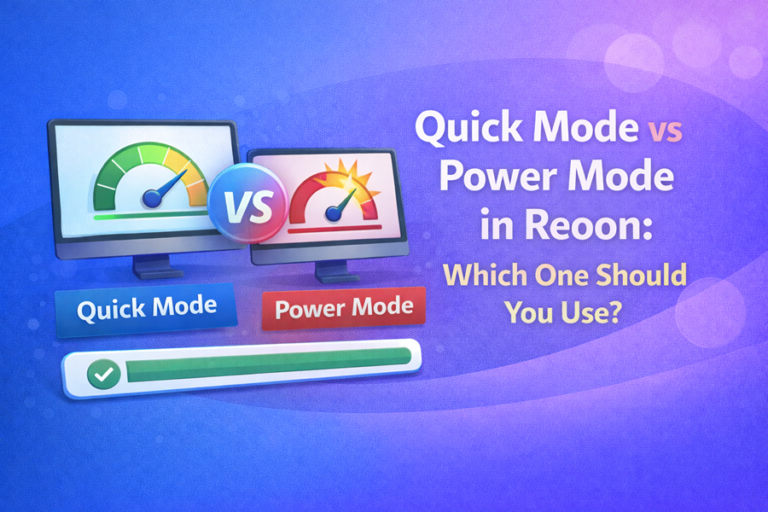
All of the above appear in the results of bulk email verification and in Power Mode single-address checks. Power Mode is the deeper of Reoon’s two verification depths — it takes longer per address but resolves more of the difficult cases (greylisting, catch-all analysis) that would otherwise end up as Unknown. The trade-offs between the two are covered in Quick Mode vs Power Mode. Alongside the status, each address also gets a score from 0 to 100 — useful for ranking the gray-zone results (catch-alls, unknowns) from most to least promising.
Turning statuses into a clean list
The whole system compresses to four moves: keep Safe (plus Role, where it fits your use case), delete Invalid, Disposable, Spamtrap, and Disabled, separate Catch-All for careful low-volume handling, and re-check Unknown and Inbox Full before the next send. Do that after every verification run and your bounce rate takes care of itself.
If you’d like to see your own list broken down this way, create a free Reoon account — you get free verification credits every day, no card required, enough to check a sample and see each of these statuses on real data.
FAQ
What is the difference between Invalid and Unknown?
Invalid is a confirmed no: the receiving server stated the mailbox doesn’t exist, and sending to it will hard-bounce. Unknown is an unanswered question: the server wouldn’t give a definitive verdict during the check. Invalid addresses get deleted; Unknown addresses are worth re-verifying a few days later, and in Reoon the credits for Unknown results are refunded automatically.
Are catch-all addresses safe to email?
They’re neither safe nor unsafe — they’re unverifiable, because the domain accepts mail for every name. Some are real, actively read mailboxes; others are dead names that will bounce after acceptance. If you use them at all, send separately, in small batches, and watch your bounce rate closely.
Should I email role addresses like info@ and support@?
For B2B outreach to small businesses, often yes — info@ is frequently the owner’s real inbox, and once verified it’s deliverable. For newsletters and consumer marketing, role addresses tend to engage less and complain more, so most senders exclude them there. It’s a use-case decision, not a validity problem.
What does the 0-100 score mean next to the status?
The status is a category; the score is a confidence grade within it. It’s most useful for the gray-zone results: among a pile of catch-all or unknown addresses, the higher-scored ones are the better bets. For addresses marked Safe, the score will simply be high and you don’t need to think about it.