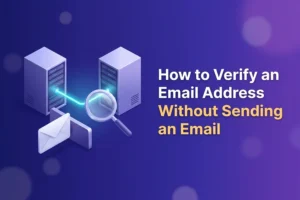
Yes, you can verify an email address without sending anything to it, and this isn’t a loophole or a gray-area trick. It’s how every email verification service works. The check borrows the same server-to-server conversation that real email delivery starts with, then stops just before any message would change hands. The mailbox receives nothing. Its owner never knows. And you still find out whether the address is real.
If you’re skeptical, good. “We check email addresses without emailing them” does sound like it should be impossible. The rest of this post opens up the machinery so you can see exactly why it isn’t.
How email delivery actually starts
When you hit send, your mail server’s first job is to find out who accepts mail for the recipient’s domain. That answer is published in the domain’s MX records: essentially the address-book entry that tells the world “mail for example.com goes to this server.” Anyone can look these records up. They’re public by design, because email delivery couldn’t work otherwise.
Your server then connects to that machine, and the two hold a short, scripted conversation. The rulebook for it is called SMTP, but you don’t need the acronym. Stripped down, the exchange goes like this:
- Your server: “Hello, I’m the mail server for yourcompany.com.”
- Their server: “Hello. Go ahead.”
- Your server: “I have a message from [email protected].”
- Their server: “Noted.”
- Your server: “It’s addressed to [email protected].”
- Their server: “That mailbox exists: send it over.” Or: “No such user here.”
Only after that last answer would the actual email (subject line, body, attachments) be transmitted.
Verification runs this same conversation up to the “it’s addressed to…” step, reads the server’s verdict on whether the mailbox exists, then politely says goodbye and disconnects. Nothing is handed over, so there is nothing to deliver and nothing to appear in an inbox. That “no such user” answer, incidentally, is the very thing that turns into a bounce when you send an email to an invalid address: verification just collects it before the mistake instead of after.
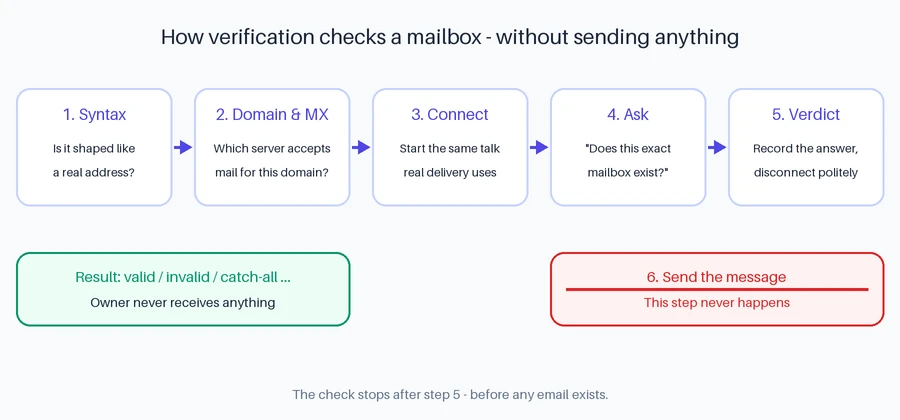
What a full check looks at, layer by layer
The mailbox conversation is the deepest part of a verification, but it isn’t the whole job. A proper check works through layers, cheapest first, because each one catches a different kind of junk:
- Syntax. Is the text even shaped like an email address? This catches
john@@example, missing dots, stray spaces, a comma where a period should be. Trivial to test, and it clears out obvious typos instantly. - Domain. Does the part after the @ exist at all: registered, resolving, alive? This layer also flags disposable domains, the ten-minute throwaway mailbox services people use to grab a discount and vanish.
- MX records. Does the domain actually operate mail servers? Plenty of legitimate websites don’t receive email at all, and an address at such a domain can never work, however plausible it looks.
- Mailbox. Does this specific address exist? This is the SMTP conversation described above, and it’s the layer that separates real verification from glorified pattern matching.
- Risk flags. The address may exist and still be a poor idea to mail: role accounts like info@ or support@ that no individual owns, disposable addresses, and patterns typical of spam traps.
Cheap tools stop after the first layer or two and still call themselves verifiers. A real one goes all the way down and tells you which layer each address failed at. Our guide to what the results look like explains every status you’ll see when a check finishes.
Why the mailbox owner never knows
Everything above happens between two servers, before anything gets near an actual mailbox. There’s no message to open, no notification to trigger, nothing in the spam folder. From the owner’s side, the day looks completely ordinary.
An analogy that holds up well: verification is a courier confirming that the name-plate on the door exists, without ringing the doorbell. The building’s front desk (the mail server) confirms the name. The resident never hears about it.
The honest limits
No method gets you to 100%, and it’s worth knowing where the edges are.
Catch-all domains say yes to everyone. Some domains are configured to accept mail for any name, real or invented. Ask their server about qwerty12345@ and it answers “exists” just as cheerfully as it would for a genuine employee. A verifier can detect that a domain behaves this way, but it can’t see through it, which is why results include a separate catch-all status. We’ve covered how catch-all addresses work and how risky they are in detail.
Some servers won’t answer. A mail server may greylist you (a polite “try again later” used to slow down spammers) or simply refuse to discuss whether a mailbox exists. An honest verifier reports those addresses as unknown rather than guessing.
If a service promises 100% accuracy on every address, that’s the overpromise talking. The truthful version: the large majority of addresses can be classified definitively, and the rest get labeled catch-all or unknown so you decide how much risk to accept.
Can you verify an email without sending it yourself?
For a single address: technically, yes. The SMTP conversation is plain text, and with command-line tools you can connect to a mail server and type the lines by hand, the way people did in the nineties. As a curiosity, it’s genuinely instructive.
As a practice, it falls apart fast:
- Mail servers distrust strangers. An unknown IP making repeated mailbox queries looks exactly like a spammer harvesting addresses, and servers respond by blocking it.
- Greylisting eats one-off attempts. Your first try often gets “come back later,” and a manual check rarely comes back.
- Your own IP’s reputation is on the line. Run these checks from your home or office connection and you can degrade how providers treat your real outgoing email. Bad trade.
This is the actual reason verification services exist. The conversation itself is simple; doing it reliably, at scale, without getting blocked takes a pool of servers with carefully maintained reputations, retry logic for greylisting, and catch-all detection. Infrastructure, not cleverness. Reoon Email Verifier runs all five layers on entire lists in minutes, and if you want the wider picture of when and why to verify, Email Verification 101 covers it from the top.
If you’d rather just see it work: create a free account and you get free verification credits every day, no card required. Paste in a few addresses you know, and one you invent, and watch the layers do their thing.
FAQ
Can you check if an email is valid without emailing it?
Yes. A verification service connects to the address’s mail server and runs the opening steps of a normal delivery conversation (enough to learn whether the mailbox exists) then disconnects before any message is sent. It works for most addresses; catch-all domains and unresponsive servers are the exceptions, and good tools label those honestly instead of guessing.
Will the person know their email was verified?
No. The check happens between servers, before anything reaches a mailbox. Nothing lands in their inbox or spam folder, no notification fires, and mail providers don’t alert users about routine delivery-protocol conversations. There is simply nothing for the owner to see.
Why do some addresses come back “unknown”?
Because the mail server on the other end declined to give a usable answer: it may be greylisting, rate-limiting, or configured never to confirm whether a mailbox exists. A trustworthy verifier reports that honestly rather than flipping a coin. Retrying later resolves many of these, but some servers stay silent on principle.
Is verifying an email address legal?
Asking a mail server whether a mailbox exists is a standard technical query: the same one made at the start of every legitimate email delivery, and servers answer it publicly by design. No message is sent and no content is stored, so verification itself is generally uncontroversial. Where legal obligations like consent and GDPR come in is how you collected the addresses in the first place: that part is on your list-building, not on the check. (Practical view, not legal advice.)