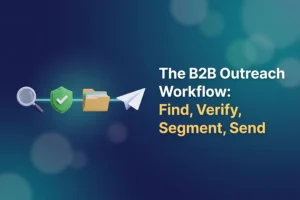
Most cold outreach fails for a boring reason: the list was already wrong before the first email left the building. A working b2b outreach workflow has four stages, and they run in this order every time. Find the right businesses. Verify every address you collected. Segment what survives into groups that deserve different treatment. Then send, in small batches, from a domain that is ready to carry them. Subject line experiments, sequence tools, personalization tricks: all of that sits on top of these four stages and none of it rescues a broken one.
This is the map rather than the manual: the decision at each stage, the check that lets you move on, and a link to the post with the detail.
Stage 1: Find the businesses worth contacting
Define the target before you open any tool
Two definitions work for B2B. The first is category plus area: plumbers in Leeds, dental clinics in Austin, wedding photographers within 40 miles of Munich. The second is role plus industry: operations managers at logistics companies with 20 to 200 staff.
Pick one and write it in a sentence. “Businesses with a website” is not a target, it is a shrug, and a list built on a shrug gets reply rates to match. The definition also decides your source.
Pick the source
- Business directories. The natural fit for category plus area work. Listings almost always carry a phone number and address, and an email sometimes. Our walkthrough of pulling leads out of Yellow Pages directories covers the mechanics.
- Map listings. Similar coverage, stronger on address and opening hours, weaker on email.
- The companies’ own websites. The gap filler. Once you have a website column, a crawler (a small program that opens each page and pulls out what matches a pattern) collects the addresses those sites publish. See how to find email addresses for local businesses.
- Your own site and inbox. People who filled in a form or bought once and went quiet. Warmest data you will ever have, and the smallest pile.
- Bought lists. Last resort, and mostly not worth it. We compared the options in scraping your own leads against buying a list: with a bought list you inherit someone else’s decay and cannot check how the data was collected.
One word that scares people off unnecessarily: scraping just means collecting what a page already shows in public, automatically into a spreadsheet instead of by hand. Only the typing speed differs.
Collect fields you will actually use
Resist the temptation to grab every column on offer. What earns its place: the contact routes (phone, website, email where the listing shows one), the address if geography matters to your pitch, the category, and one detail you can use in the opening line so the message reads as though a person wrote it.
Know the honest yield before you are disappointed by it
Directory data is contact information businesses published so they would be contacted, and treating it that way keeps you on comfortable ground: write to them about their business, and stop the moment they ask you to.
Now the arithmetic nobody advertises. Plenty of listings show no email at all, sometimes most of a category, and the website crawl only closes part of that gap. Of the addresses you do collect from directories, roughly 10-25% fail verification in our experience, because the listing was accurate in 2021 and the person who read that inbox left in 2023. Plan for a raw scrape of 3,000 rows to become closer to 1,200 usable contacts. That is a normal result.
Where Reoon fits here. The Reoon YellowPages Scraper is a desktop app for Windows and Mac that pulls business listings from seven directories, covering the US, UK, Canada, Germany, Switzerland, India, and Australia with limited support. It extracts 18 fields per listing, including company name, category, phone, email, full address, website, rating, and years in business, and it carries the built-in website crawler mentioned above for filling in what a listing leaves out. Export goes to CSV or Excel. The free version runs with limited daily searches and exports and needs no payment details, which is enough to see what a target category actually contains.
Stage 2: Verify every address, every time
Verification is not a cleanup job for when bounces get embarrassing. It runs before anything is sent, on every address, including the one you copied off a company’s contact page an hour ago. A published address only proves that somebody typed it once. Whether the mailbox still accepts mail today is a separate question.
The spreadsheet tidying comes first (deduplicate, drop junk rows, decide about generic inboxes), which saves credits on rows you were going to delete anyway. That part is written up as six cleaning passes for a scraped email list, so this post will not repeat them.
What a bulk verifier gives back is a status on every row:
- Safe or valid. The mailbox exists and accepts mail. This is your send list.
- Invalid. The mailbox does not exist. Delete permanently. Every “let’s just try it” here is a bounce you chose.
- Catch-all. The domain accepts mail addressed to any name, so the server cannot confirm your specific mailbox. Not dead, just unknown. Park it in its own file.
- Disposable. A throwaway address from a temporary mail service. Delete now.
- Role. A shared inbox such as info@ or support@. At small businesses this is often the owner’s real inbox, so keep the ones that plausibly reach a decision maker and drop the noreply@ types.
- Unknown. The server would not give a clear answer. Hold these back rather than gambling.
Our article on what the different email verification statuses mean takes each one apart properly.
One rule people skip: results go stale. Anything verified more than about 30 days ago needs checking again before reuse, and a list that sat in a folder over a quiet quarter counts as raw.
Where Reoon fits here. The Reoon Email Verifier takes the scraper’s CSV export directly, or runs through a live API when an address needs checking the moment someone types it into a form. It detects catch-all domains, disposable addresses, known spam traps, and role-based accounts, and reports the unknowns honestly instead of guessing. Unknown results are not charged for. Registration comes with free daily credits and no credit card, enough to test a sample of your own list and see the failure rate.
Stage 3: Segment before you write a single word
A verified list is still one undifferentiated pile. Segmenting is what lets one message sound specific to the person reading it, and it works on three axes.
By fit. Category, company size, location, anything that changes what you would say. A message to 40 independent bakeries should not be the message to 40 regional distributors with the company name swapped in. If two segments would get identical copy, they are one segment.
By contact quality. Safe addresses go first and carry the main campaign. Catch-all addresses go into a smaller, later batch, sent only once the main campaign has shown a clean bounce rate. Role addresses can sit in either group, but expect weaker replies and write them something shorter, because a shared inbox gets skimmed rather than read.
By channel. The one most people skip, and it quietly throws away half the list. A business with a verified phone number and no email is not a dead row, it is a phone row. A business with only an address is a postcard row, or a walk-in if it is local to you.
Then build the list you hope never grows: the suppression list, a permanent record of addresses and domains you will not contact again, covering every hard bounce, opt-out, complaint, and clear “no thanks.” Check it against every new batch, including batches you collect months from now.
Stage 4: Send at a volume your domain can carry
Four things decide whether your mail arrives, and copy is not one of them.
Domain readiness. Your sending domain needs its authentication records in place (SPF, DKIM, and DMARC, the DNS entries that let receiving servers confirm mail genuinely came from you). A new or long-dormant domain also needs warm-up: sending small, gradually rising volumes over weeks so it builds a normal-looking history instead of appearing from nowhere with 500 messages. We covered how long domain warm-up takes separately, and the rest of the setup lives in our cold email deliverability checklist.
Volume per mailbox per day. Lower than most people assume, and it is per mailbox, not per campaign. Our guide on how many cold emails to send per day has the numbers. The mistake to avoid is treating a verified list as permission to send it all on Tuesday.
The message itself. Plain text, one specific reason you are writing to this business, one small ask. Read it aloud first; if it does not sound like something you would say on the phone, rewrite it.
Follow-ups and the exit. Two or three follow-ups, spaced out, then stop. An opt-out that works on the first click, honored immediately and added to the suppression list. And watch bounces daily on the early batches: set a threshold you will respect (under about 2% is the usual comfort zone) and pause when you cross it instead of investigating afterwards.
The B2B outreach workflow in one table
| Stage | Tool or method | Output | Check before moving on |
|---|---|---|---|
| Find | Directory scraper, map listings, website crawler, own records | Raw CSV of businesses with contact fields | Rows match the written target, duplicates removed |
| Verify | Spreadsheet cleanup, then a bulk verifier or live API | Same file with a status on every address | No unverified address left in the send file |
| Segment | Spreadsheet or CRM, plus a suppression list | Named segments, each with a channel and a message | Every row sits in one segment or on the suppression list |
| Send | Authenticated, warmed mailbox and a sending tool | Small daily batches, capped follow-ups | Bounces holding under about 2% on the early batches |
An honest opinion about outreach that flops
After enough campaigns you notice that most “our cold email does not work” problems are list problems wearing a copywriting costume. The symptom looks like low replies, so people rewrite the subject line, buy a personalization tool, redo the sequence. Meanwhile a fifth of the sends bounced, the domain quietly lost reputation, and much of what did deliver went to shared inboxes at businesses that were never a fit.
Not every failed campaign works this way. Bad copy is real, and some offers have no market. But if you have only got the patience to fix one thing, fix the list first. It is the fix that makes every later improvement measurable.
The one-page version
Print this and stick it somewhere.
- Write the target in one sentence: who they are, where they are, why they would care.
- Choose one primary source and one backup source.
- Collect only the fields you will use in the message or the follow-up call.
- Deduplicate and delete junk rows before spending a verification credit.
- Verify every address, including the ones taken from a company’s own website.
- Split by status: safe, catch-all, role, invalid, disposable, unknown.
- Delete invalid and disposable. Park unknown. Make a conscious choice about catch-all.
- Segment by fit, then by contact quality, then by channel.
- Start the suppression list today and add every bounce and opt-out to it forever.
- Confirm authentication and warm-up on the sending domain before the first batch.
- Send small batches, plain text, two or three follow-ups at most, opt-out that works.
- Watch bounces daily, pause at your threshold, re-verify anything older than about 30 days.
To find out which stage is costing you most, run a quick test. Take 200 rows of your current list, register for the verifier with its free daily credits, and look at the percentage that comes back invalid. If it is comfortably low, your problem is the message or the offer. If it is not, you found the leak.
FAQ
How long does it take to set up a b2b outreach workflow?
A first pass takes a working day or two. Defining the target and collecting a few thousand rows is a morning. Cleaning and verifying a list that size takes an hour or so, and segmenting another hour. The slow part is domain warm-up, which runs for weeks in the background, so start it before you need it.
Do I really need to verify emails taken from a company’s own website?
Yes, and those addresses fail more often than people expect. A published address only proves it was correct when the page was written. Websites outlive staff, mail providers get switched, and old contact pages sit untouched for years while the mailbox behind them quietly stops accepting mail. Verification checks the state of the mailbox today, the only state your bounce rate reacts to.
What should I do with catch-all addresses?
Keep them, in their own segment, behind the safe addresses. A catch-all domain accepts mail for any name, so nobody can confirm your mailbox exists until you send. Email them in a small batch once the main campaign has shown a clean bounce rate, and watch closely. If your verified list is already big enough to keep you busy, skipping them entirely is defensible.
How many leads do I need before I start sending?
Fewer than you think. Two hundred verified, well-targeted contacts in one segment teach you more about your offer than 5,000 scraped rows you have not sorted. Start small, watch replies and bounces for a week, fix whichever looks wrong, then scale the collection side. A bigger list multiplies whatever your process already does, including the mistakes.